| TL;DR Address proof must be dated within 90 days. Anything older is treated as stale evidence and rejected.Verification typically clears in 1 to 3 business days when documents are right, and can run to several weeks when they are not.Anyone owning 25% or more of the company has to provide valid identification, not just the person who signed up.The rejection notice tells you what failed. Align your resubmission with that specific feedback, not with a general improvement. Short version: verification is a matching exercise between three independent documents, and the most common failure is a utility bill that was fine last quarter. |
A six-month-old utility bill is a perfectly good utility bill. It proves you live somewhere, it has your name on it, and it will be rejected.
Amazon’s verification treats address documents older than 90 days as stale evidence, and it does so without much explanation. Sellers who have never encountered document-age rules read the rejection, conclude the image quality was poor, rescan the same bill at higher resolution and submit it again. It fails again, for the same unstated reason.
Three Pillars, Not One Form
Verification checks three things independently, and a document that satisfies one does nothing for the other two.
Identity. Who the responsible people are. Not just the account creator: anyone holding 25% or more of the company has to provide valid identification. Sellers with a silent partner or an investor above that threshold routinely discover this mid-review, having assumed their own passport would cover it.
Address. That the business exists at a physical location. This is where the 90-day rule bites. A utility bill or bank statement works; both must be current.
Financial. That you control the account money will land in. A statement showing the last four digits of the card is the usual form, and the name on it has to match the account.
The full document list and the sequence Amazon works through are set out in this guide to Amazon seller account verification, including which combinations satisfy which pillar.
The Expiry Nobody Reads
Ninety days is the number to write down, because it converts a vague instruction into a scheduling problem you can solve.
An old bill from six months ago will not be accepted. The reasoning is straightforward once stated: an address document is evidence that you are at the address now, and a document from two quarters ago is evidence about a previous quarter.
The practical response is to gather documents in the week you intend to register rather than from a folder assembled earlier. That sounds trivial and it is the single most common cause of a multi-round rejection cycle.
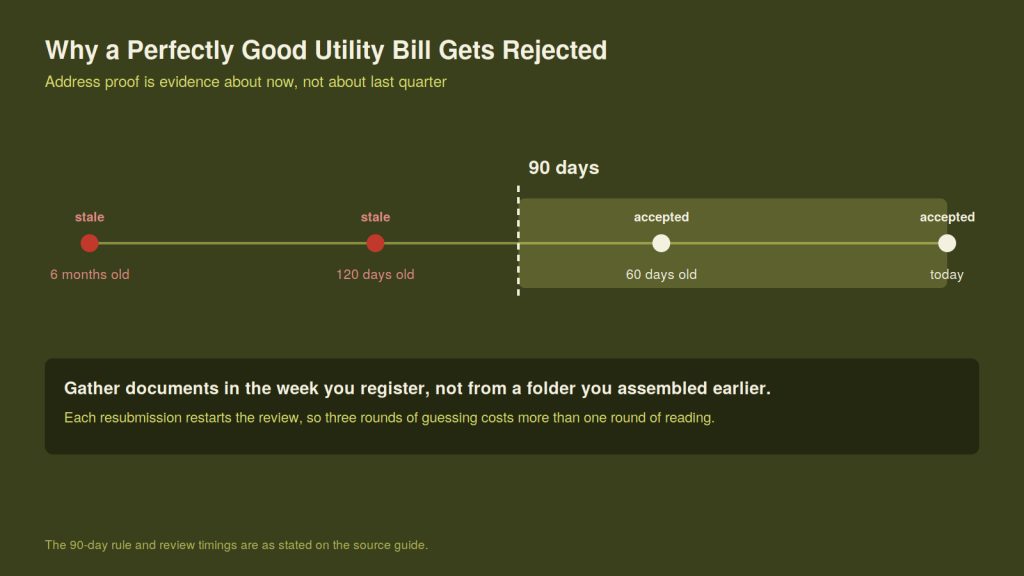
The cutoff does not care how good the document is. It cares how old it is.
How Long It Should Take
Two figures circulate, and both are accurate because they describe different things.
Verification typically takes 1 to 3 business days when documents are submitted correctly. Some cases clear inside 24 to 48 hours. Cases that go wrong can run to several weeks, and the difference is almost never Amazon’s queue depth.
| Situation | Realistic window |
| Clean submission, all three pillars matching | 24 hours to 3 business days |
| One document requiring manual review | Up to a week |
| Repeated rejections on the same document | Several weeks |
The third row is the one worth avoiding, and it is usually self-inflicted. Each resubmission restarts a review, so three rounds of guessing costs more than one round of reading the rejection properly.
Read the Rejection Literally
When a submission fails, the notice names what failed. The instinct is to improve everything: rescan at higher resolution, crop more neatly, submit a different document type as well for good measure.
That is the wrong move. Align your corrective action entirely with the specific feedback given. Submitting additional documents that were not asked for adds surface area for a new mismatch, and changing a document that already passed can turn a one-issue case into a two-issue case.
If the notice says the address document is not acceptable, replace the address document. Leave the other two alone.
The Phishing Window
Verification creates an unusual and exploitable condition: for several days you are actively expecting emails from Amazon asking you to submit identity documents.
That is exactly the state phishing relies on. An email arriving mid-review asking for a passport scan and a bank statement does not look suspicious, because a legitimate one might.
CISA’s guidance on recognizing and reporting phishing makes a point worth carrying into this specific window: the old tell of poor grammar and misspelling is no longer reliable, because messages generated with AI assistance now arrive with perfect spelling and plausible phrasing. Its framing is three steps, recognize, resist, delete.
The practical rule during verification is narrow and absolute. Never upload a document from a link in an email. Open Seller Central directly, navigate to the case, and upload there. If the request is genuine it will be waiting for you inside the account. If it is not, you have lost ten seconds.
What to Do Before You Start
Print or download three documents on the same day: photo identification for every person at or above the 25% ownership threshold, an address proof dated within the last 90 days, and a financial statement in the account holder’s name.
Put the three side by side and read the name and address on each one out loud. If any of the three disagrees with the others, or with what you are about to type into the form, fix it before you submit rather than after.
That comparison takes five minutes and is the difference between a three-day approval and a three-week one.
About the Author